
Smart Breakout EA
Automate support and resistance breakouts in MetaTrader 4. The EA maps the levels, places pending orders and manages the trading cycle with configurable hedging and trade controls.

MetaTrader 4
Support / resistance breakouts
H1–D1 · H4 suggested
Automated · Multi-pair
Map the levels. Prepare both directions.
Smart Breakout EA calculates recent support and resistance levels and draws them on the chart. It refreshes those levels on each new bar and places pending orders around them.
A breakout can activate the corresponding order. If price reverses, the configured hedging logic can trigger an opposite order as the EA continues managing the cycle.
Calculate the levels
The EA identifies support and resistance and updates the chart when a new bar forms.
Place pending orders
Buy and sell pending orders prepare for movement through either side of the range.
Control the cycle
Configure hedging, lot sizing, trailing stops and trade-count balance to suit your setup.
See the levels and execution context.
The chart brings together calculated trading levels and the EA’s running state. Review the working screenshot to see the strategy in MetaTrader 4.
The EA maintains opposite pending orders as part of its hedging logic. A reversal can activate an order in the other direction. HedgeRatio controls the difference between buy and sell trade counts.
With HedgeRatio set to 3, the difference between buy and sell trade counts is limited to three. Examples include 3 buys versus 0 sells, 4 buys versus 1 sell, or 13 buys versus 10 sells.
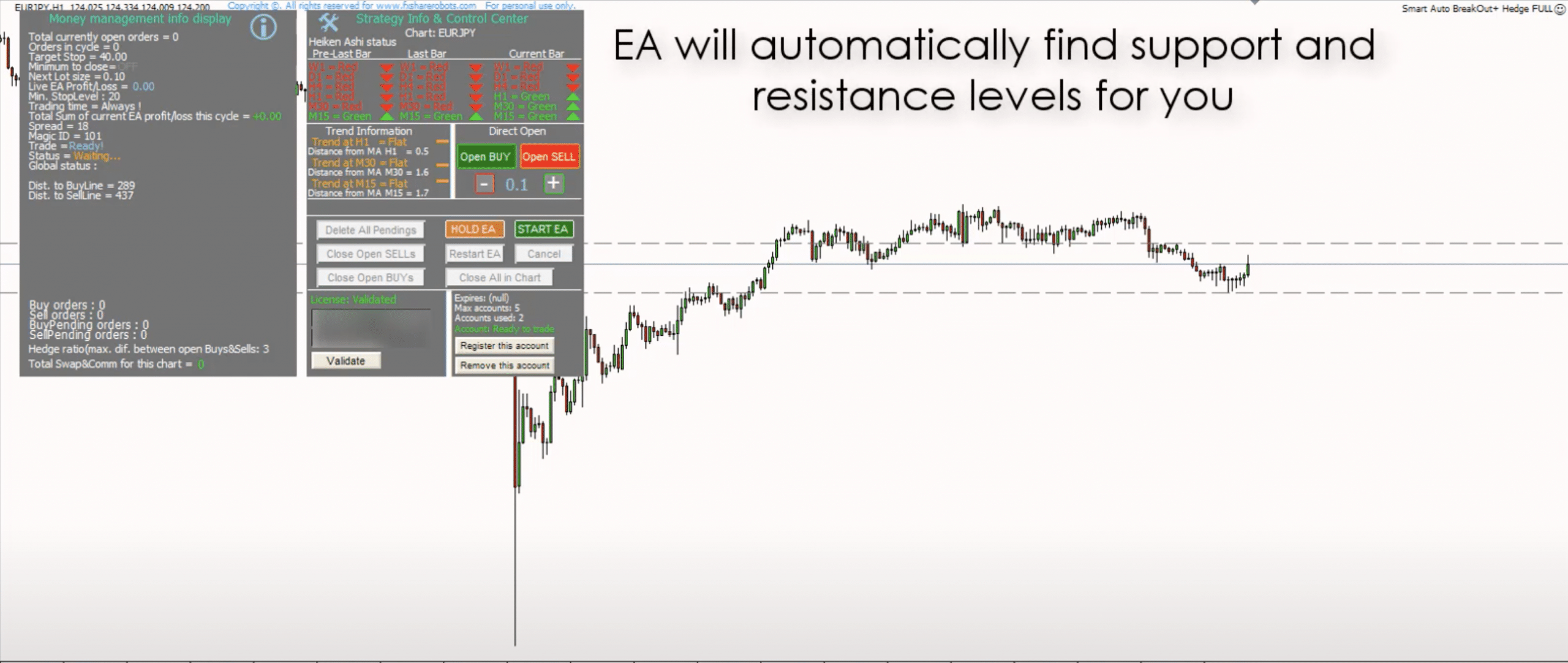
Set the rules around the trading cycle.
Adjust the strategy parameters, Smart Lot sizing and trade-management settings from the EA configuration. The user manual explains the controls and their behavior.
The EA includes Smart Lot sizing, risk-management parameters and a trailing-stop system. A reverse option is available for changing the entry behavior. See the manual for the parameter definitions.
The EA records state in memory/log files so it can recover its trading information after a platform interruption or lost connection.
The EA supports multi-pair operation and is described for Forex pairs, metals, stocks, commodities and cryptocurrencies offered by your MT4 broker.
The specified timeframe range is H1–D1, with H4 suggested as a starting point.
The original setup examples are $100 with 0.02 lot for a single pair, or $2,000 with 0.05 lot for three to five pairs. Suitable sizing depends on the symbols, margin requirements and configuration.
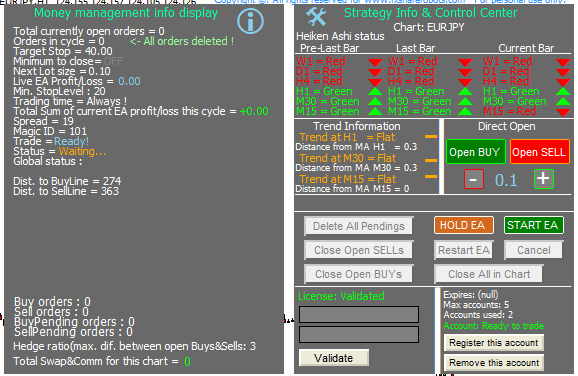
Inspect the cycle. Manage the trades.
The information display tracks the EA’s calculations, trading cycle and notifications. Version 2.0 adds on-chart controls for opening, closing and managing trades, plus trend calculations across timeframes.
License account registration and removal are also available through the updated interface.
Choose your MT4 account allowance.
Choose one, three or nine accounts. The same Smart Breakout strategy and configurable controls sit at the heart of each option.
Basic
1 account · Lifetime license
Smart Breakout EA
Configurable strategy controls
Lifetime license
$59Add to cart
Advanced
3 accounts · Lifetime license
Smart Breakout EA
Configurable strategy controls
Lifetime license
$79Add to cart
Professional
9 accounts · Lifetime license
Smart Breakout EA
Configurable strategy controls
Lifetime license
Supplied default configuration
$99Add to cart
Install the EA. Configure your workflow.
The installer prepares the MetaTrader 4 components. Start from the supplied defaults or adjust the strategy to your requirements, using the manual for each parameter and the video for setup and operation.
Installation & usage
A closer look at the updates.
Introduced a new interface with on-chart controls to open, close and manage trades, a trend-calculation window for each timeframe, and account registration/removal controls. The release also included installation and safety fixes.
The historical release notes introduced rental licensing. The purchase options currently displayed here are the lifetime licenses shown above.
Added a more detailed information display, updated the core engine and automatic trading levels, and improved AutoHedge controls and security settings. This release also fixed JPY-pair support and memory-file bugs.
Updates are free for existing owners. Sign in, open Downloads, then download and reinstall the updated product files.
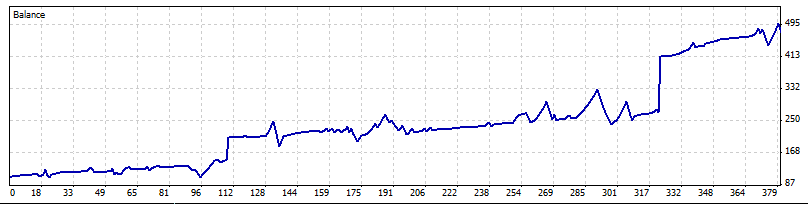
Inspect the archived test graph.
View the historical graph from the small live-account test described for Smart Breakout EA.
Before you configure the EA.
Yes. Support and resistance levels are recalculated and refreshed on each new bar.
Yes. The updated chart interface includes controls to open, close and manage trades.
The user manual describes each parameter, the trading logic and how to use the EA.
Need help with setup?
Contact support for installation, settings and licensing questions.