Skip to content
MetaTrader 4 · Oscillator-based automation

Stochastic EA

Your Stochastic rules.
Automatically applied.

Turn Stochastic levels into a configurable MT4 trading setup. Adjust the oscillator, define your trigger levels and manage the EA from a clear on-chart display.

stochastic ea — automated MetaTrader trading software
Platform

MetaTrader 4

Fully automated Expert Advisor

Strategy

Stochastic levels & reversals

Timeframe

M30–H4

Choose the timeframe that fits your tested setup.

License

Unlimited accounts

Lifetime version · Free future updates

How it works

From oscillator settings to automated entries.

The Stochastic oscillator identifies overbought and oversold zones. This EA makes its parameters and trigger levels adjustable for retracement, reversal or scalping approaches. These levels are configurable inputs, not fixed trading signals for every market.

In focus

Stochastic EA

Configurable entries. Visible controls. Your trading parameters.

01 · Tune the oscillator

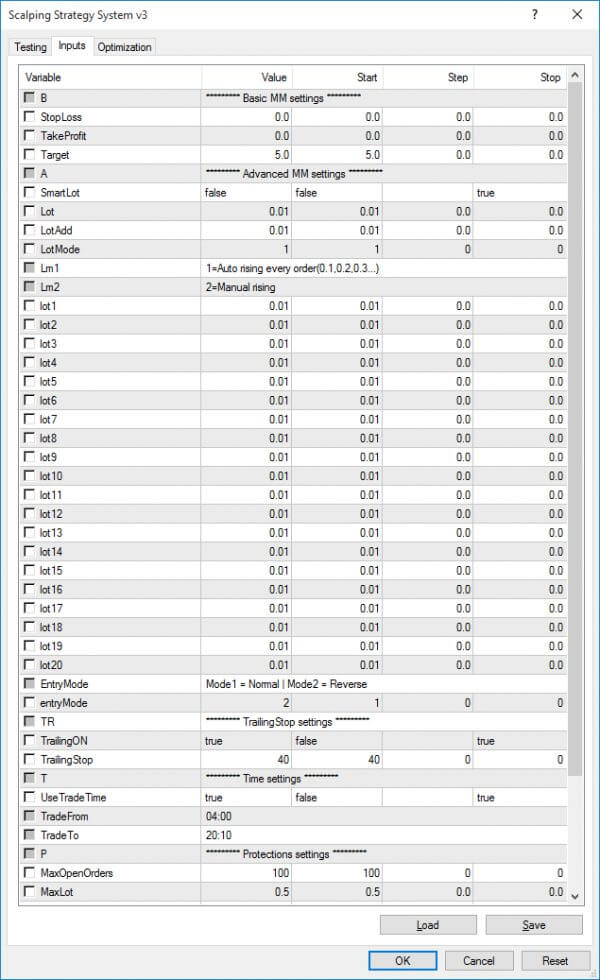
Set the K period, D period and slowing to match your preferred Stochastic configuration.

02 · Define the levels

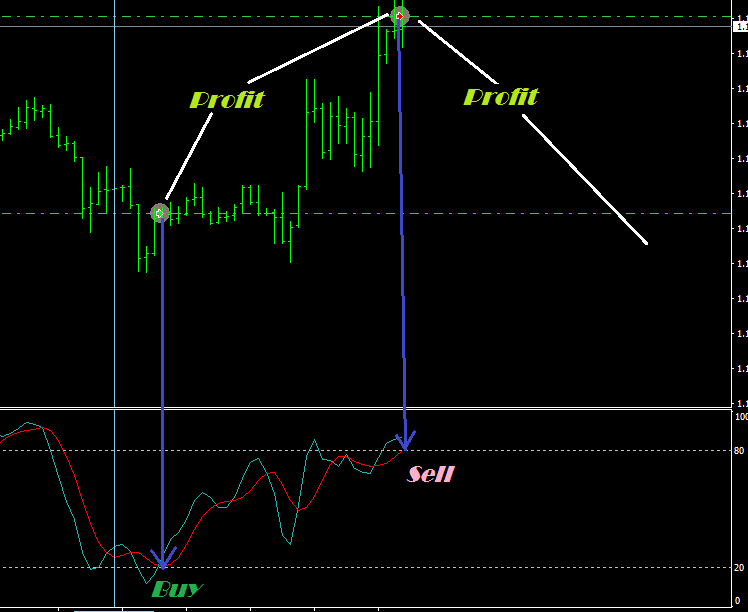
Choose the upper and lower thresholds. For example, 80 and 20 define the zones the EA reacts to.

03 · Choose the direction

Run the normal logic or reverse the trading side at those same levels.

Stochastic entry levels on MT4 · Select to enlarge
The entry logic

See the levels.
Follow the process.

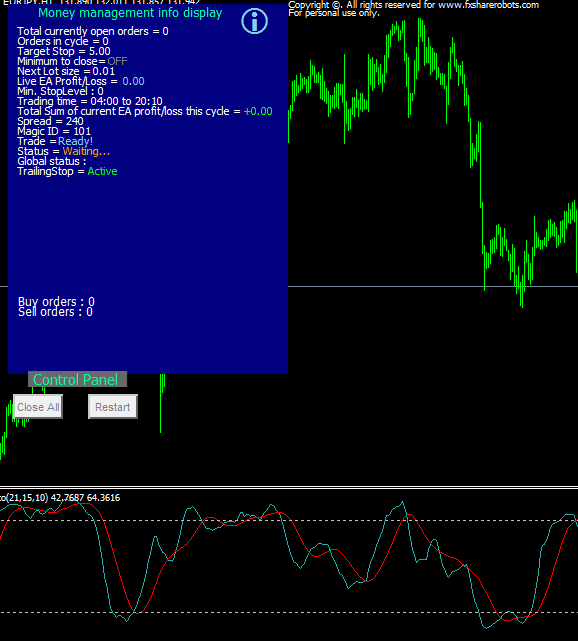
The information display tracks the trading process. On-chart buttons can close the orders opened by the EA and restart it. Separate magic numbers support multiple charts, while memory files record cycle activity.

Select the image to inspect the chart at full size.

A closer look

Chart views & configuration.

Stochastic entry levels on MT4
EA input parameters
EA input parameters
On-chart information display

The information display tracks the trading process. On-chart buttons can close the orders opened by the EA and restart it. Separate magic numbers support multiple charts, while memory files record cycle activity.

Choose automatic or manual lot sizing and adjust the EA’s available protection options. Use a different magic number for each chart when running several symbols. Supported instruments depend on your MT4 broker.

Licensing

One license. Your MT4 setup.

Unlimited accounts, a lifetime version and free future updates. Choose the license for your MT4 trading setup.

For MetaTrader 4

Unlimited

Unlimited accounts
Lifetime version
Free future updates

What’s included

One starter .set file and a user manual are included, alongside the preconfigured default settings.

Load your chosen settings and check the setup in MT4’s Strategy Tester and on a demo account before using it live.

Includes the on-chart control interface, customizable Stochastic parameters, reverse mode, automatic or manual lot sizing and a memory file system.

Keep exploring

Find the right setup for you.

Compare the tools, explore packages or ask us a product question.

Back To Top
0
    0
    Your Cart
    Your cart is empty↩ Return to Shop
      Apply Coupon